

Key takeaways on scheduled reports
- A Schedule button appears on the document screen: analytic report, Discovery answer, My alerts page, connections journal. It captures the view you are looking at, filters included.
- One send, as many documents as recipients. The content is not computed once and broadcast to everyone: it is recomputed for each recipient, according to their own visibility scope.
- Direct consequence: you can subscribe a whole team to the same schedule. Each person receives their own figures, nobody sees their neighbour's.
- The accompanying message accepts merge variables, including a link to the live report with its filters already applied.
- Everything is managed from the automations list: enable, disable, change the frequency or the recipients, and check that the last send went out.
The report nobody goes looking for
A dashboard is worth exactly as many times as somebody opens it.
That is the paradox of every steering tool. You build an accurate report, you set its filters to the millimetre, you share it, and three weeks later all that remains is a bookmark in three people's browsers. Not out of disinterest: because consulting a report means remembering it exists, logging in, and finding the right scope again, on a Monday morning where fifteen other things are competing for the same attention.
The usual workaround comes down to one person: somebody exports the report, emails it, and does it again the following week. It works, right up to that person's holidays. And it does not solve the real problem: everyone receives the same document, computed on the scope of whoever exported it. The regional director and a team supervisor get the same figures, which suits the first and does not help the second.
Scheduled sends answer both difficulties at once.
Scheduling from the document screen
On an analytic report, next to the PDF export button, a Schedule button appears once your filters are applied.
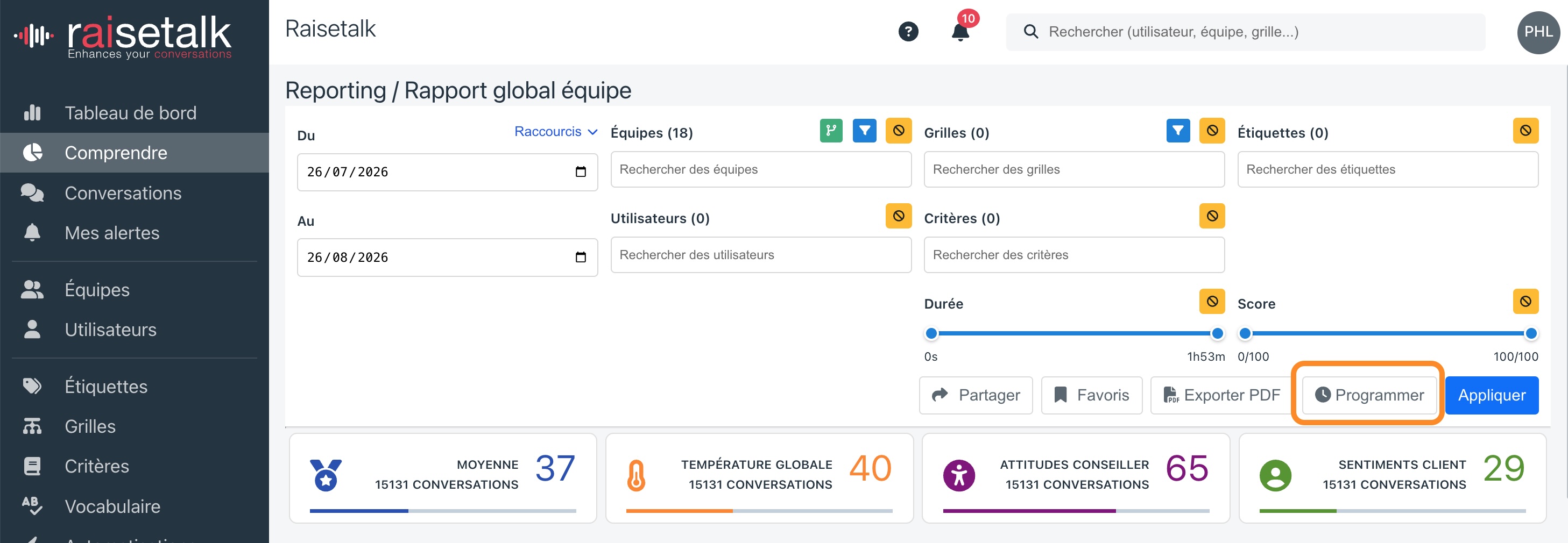
That detour via the report screen is no accident of design. An analytic report is read through a dozen filters: period, teams, advisors, scorecards, criteria, tags, score. Asking for them again in an automation form would mean making the user re-enter what they have just set, with the certainty that a schedule would eventually stop matching the report it is supposed to send.
So the button captures the current view as it stands. One click opens the form on top of the report, without leaving the page, with the document and its filters already in place.
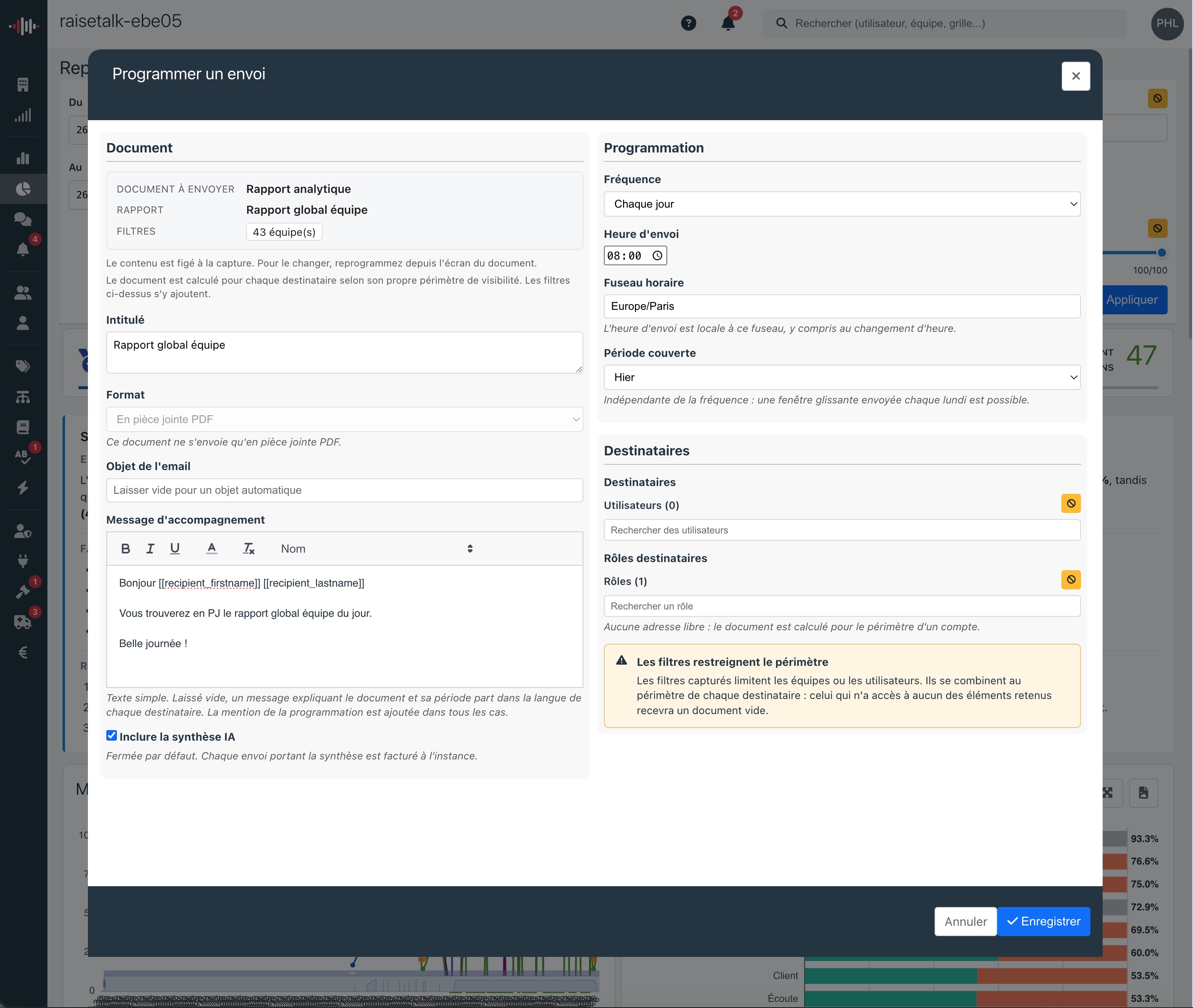
Three things are left to set: the rhythm, the covered period, and the recipients.
The frequency is daily, weekly or monthly, with the time and the time zone, the latter also governing behaviour across daylight saving changes. The covered period is deliberately independent of the frequency: nothing forces a weekly send to cover one week. A rolling thirty-day window sent every Monday smooths out the ups and downs of a small team far better than a calendar split.
One send, as many documents as recipients
This is what genuinely sets the feature apart from a recurring email.
The document is not produced once and then distributed. It is recomputed for each recipient, according to their own visibility scope, and the filters you captured are added on top. A manager and their director subscribed to the same schedule therefore receive two different documents, each limited to what they are allowed to see.
That changes the nature of what can be sent. A single schedule, set once, serves a whole team: everyone receives their own results without anyone having to create one rule per person, and without an advisor discovering their neighbour's figures along the way. Individual follow-up becomes a routine rather than a preparation job.
It is also why the form offers no free email address. An outside address has no account, therefore no scope, therefore nothing on which to decide what it is allowed to receive. Sending anyway would mean moving conversation data to a mailbox the permission model knows nothing about. Recipients are platform users, named individually or by role.
Watch out for over-restrictive filters. Captured filters combine with each recipient's scope, they do not replace it. A report filtered on three teams, sent to somebody with access to none of them, will produce an empty document. The form warns you as soon as your filters narrow the scope: that is the moment to check that your recipient list and your filters are talking about the same teams.
Four documents, four uses
The same mechanism serves four screens, each with its own logic.
| Document | Where to schedule it | What it brings |
|---|---|---|
| Analytic report | From the report, filters applied | Recurring figures: averages, trends, top and bottom criteria, with the AI summary as an option |
| Discovery | From an answer you obtained | An open question asked again on every send, over recent conversations |
| My alerts | From the My alerts page | A recap of the quality alerts received over the period |
| Connections journal | From the journal | The current state of account activity, for those entitled to it |
Discovery deserves a note, because it does not behave like the others. You are not distributing a frozen answer: on every occurrence, the question is asked again, over the conversations of the period, once per recipient scope. A watch such as "which competitors are mentioned this week" or "which pain points come back most often" becomes a weekly appointment, with an up-to-date answer rather than a snapshot that ages.
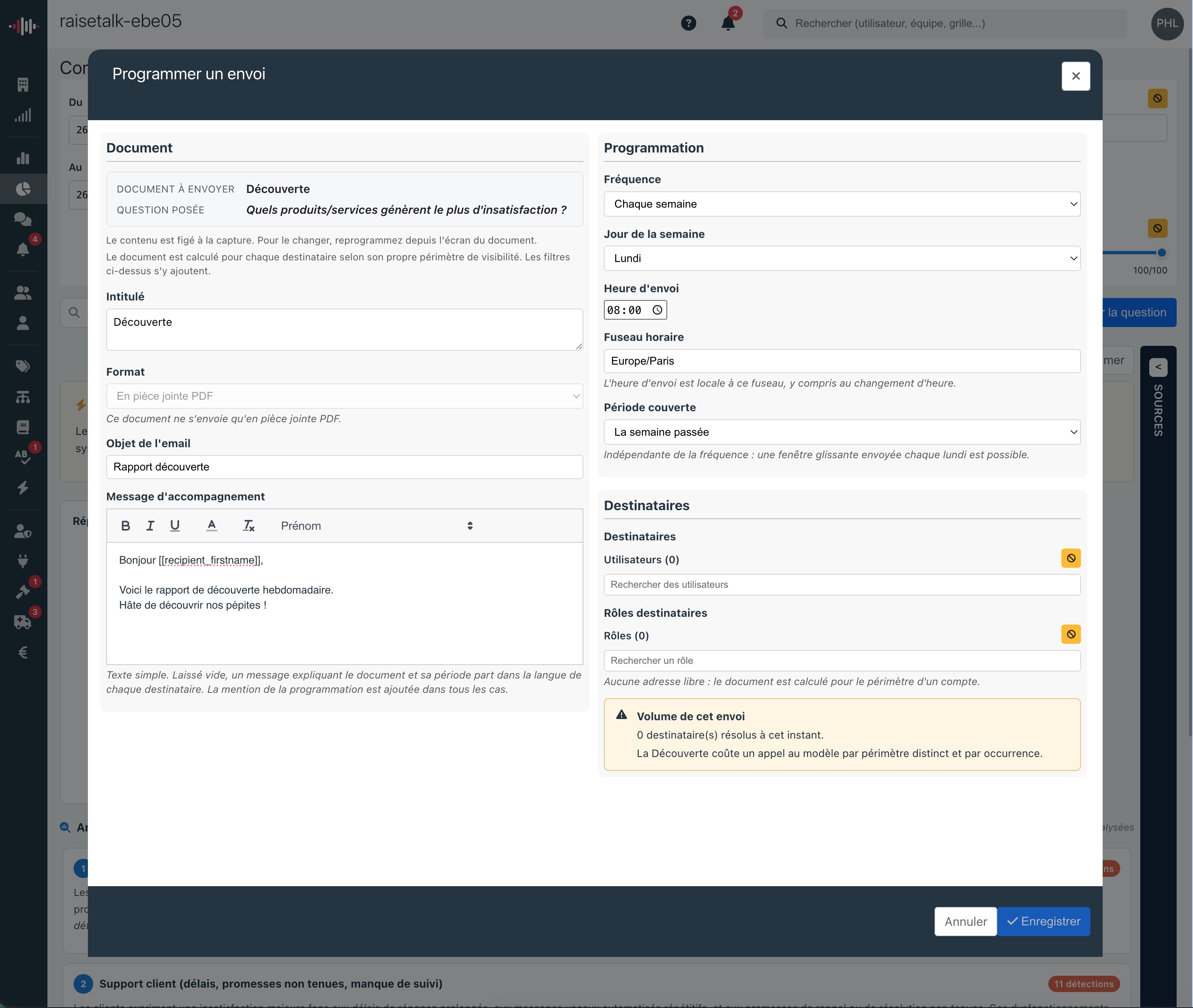
One trade-off to know before aiming wide: each distinct scope triggers an analysis. The form displays the number of recipients resolved while you fill it in, precisely to give you the order of magnitude before saving.
The analytic report and Discovery go out as PDF attachments. The two lists can be read either in the body of the message or as an attachment, as you prefer.
What each role gains
The same feature does not serve the same purpose depending on where you sit in the organisation.
Leadership and cross-functional roles stop depending on somebody to receive their monthly read. The global report arrives on the first Monday of the month over the chosen period, with the AI summary if it is enabled, that is an executive summary, key facts and recommendations written from the figures of the scope. Enough to open a review meeting without having prepared a deck. And for the committee itself, what a management report should contain is covered in a separate article.
Operational managers receive the report for their own teams, not their neighbour's. That is the difference between a document you skim and a document you act on: when the figures are yours, the next question is immediate. The link to the live report, slipped into the message, moves you from reading to exploring without starting again from a home page.
Advisors can finally be included in a follow-up routine. Until now, sending each person their own results meant as many rules as people, or weekly manual work. A single schedule is now enough, each person's scope doing the sorting. It is the natural extension of the right of reply and of individual follow-up: nobody improves on figures they never see.
Quality leads find their use on the Discovery side and on the My alerts page. A watch question asked again every week, a recap of the alerts that fired: monitoring becomes passive, you no longer maintain it, you receive it.
Administrators, finally, get the connections journal on a schedule to follow real adoption of the platform, and a single control point. Every schedule in the organisation lives in the same list as the notifications, with its status and the date of the last send.
The message that comes with the document
A report attached with no word of explanation rarely gets read. So the form lets you write the subject and the body of the email, with the same merge variables as notifications, insertable from a dropdown menu.
| Variable | What it displays |
|---|---|
[[recipient_firstname]] | The recipient's first name |
[[recipient_lastname]] | Their last name |
[[recipient_name]] | Their full name |
[[recipients]] | The list of everyone receiving this send |
[[report_link]] | A link to the live report, filters included |
The last two are worth a word. [[recipients]] makes visible who else received the document, which avoids duplicate follow-ups and "forwarding just in case". [[report_link]] does not open the attachment but the live report in the platform, with the schedule's filters already applied: the reader finds the same figures, but this time can navigate, open a conversation, adjust a period.
Left empty, the subject and the message go out in an automatic version, written in each recipient's own language. And whatever your text, a footer states which schedule the message comes from, with its number and a link to edit it: nobody is left with a recurring email whose origin is a mystery.
Managing, correcting, stopping
Once saved, the schedule joins the automations list, under the Scheduled type, alongside the notifications.
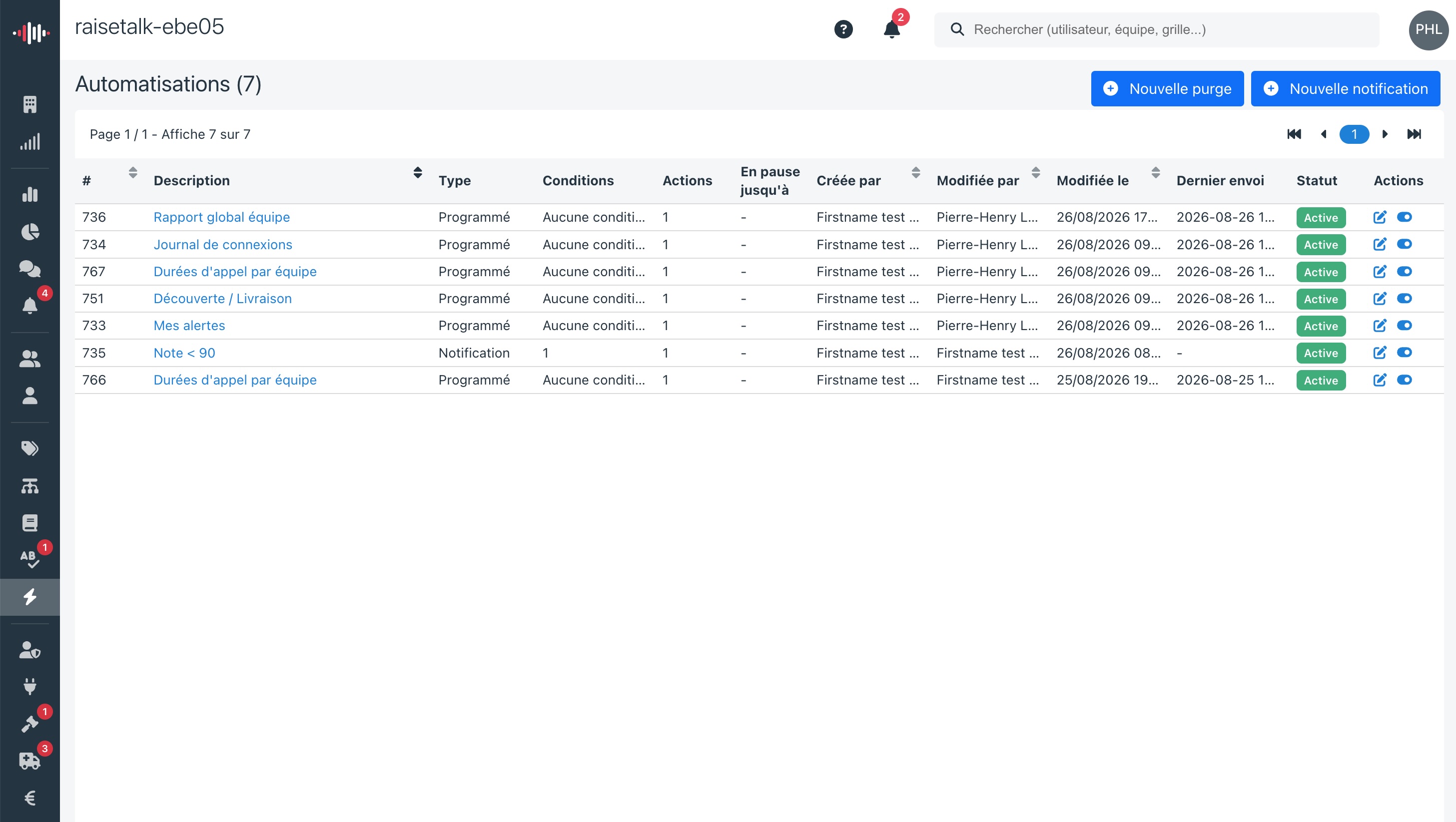
There you enable or disable the rule, change the frequency, the time, the recipients or the message, and a Last send column tells you whether the latest occurrence went out. A schedule that fails does not do so quietly.
One thing is deliberately not editable from that list: the content. The document and its filters stay frozen as they were captured. For a different scope, you start again from the report screen and create a new schedule. This is a deliberate choice: a schedule whose content could be edited remotely would lose the link with the view that gave rise to it, and nobody could say any more what exactly this morning's report represents.
What it is not
Three limits are worth knowing before you start.
It is not an external distribution tool. No customer, no supplier, no shared mailbox without an account: computing by scope requires an identified user. To share a report outside, the manual PDF export remains the right tool.
It is not a replacement for notifications. The two families live in the same module but answer different questions. A notification reacts to a conversation that has just been analysed, within the minute. A scheduled send gives the overview at a fixed time. One is for intervening, the other for steering.
It is not free in compute terms. Every send produces one document per distinct scope, and the AI summary, if you enable it, is billed on every send that carries it. It is off by default, incidentally. On a wide audience, a relevant weekly schedule beats a daily send nobody opens.
Start small
The temptation with this kind of feature is to equip the whole organisation on day one. Our customers' experience with the other reports suggests the opposite.
Pick a report you already consult regularly, set its filters, schedule it for yourself alone, at whatever frequency feels right. After three sends, you will know whether the covered period is the right one and whether the rhythm matches your decision-making rhythm. That is when you widen the recipient list, not before.
The best way to judge a steering routine is still to set it up yourself, on your own conversations, and see what turns up the following Monday. So, try Raisetalk now.