

Key takeaways on built-in support
- Raisetalk now ships with its own built-in support module: every user, whatever their role, creates and tracks their requests from the Support menu — no email, no third-party tool.
- Each request is handled like a conversation: a discussion thread, attachments, a clear status at every step and automatic email notifications. Full traceability stays inside the application.
- Five request types structure the exchanges: bug, question, evolution, setting, documentation. The technical context is attached automatically, with zero description effort.
- Partners become the first-level support of their clients: requests from their client instances land in their own Support menu, with statuses, priorities and internal notes invisible to the end client. Isolation between clients remains total.
- It is a matter of consistency: a quality monitoring tool that analyses the voice of your customers owes it to itself to listen to the voice of its own users with the same rigour.
The voice of the customer starts with the voice of our users
Raisetalk spends its days listening: 100% of your conversations analysed, your customers' complaints and thanks picked up, weak signals surfaced, the Voice of the Customer aggregated to drive your quality. That is our job, and that is the promise of conversational analysis.
One question remained, almost embarrassing in its simplicity: what about the voice of our users — who listens to it, and how?
Until now, the answer looked like that of most business tools: an email to the team, a message to the consultant supporting you, sometimes a call. Channels that work, but that scatter information, lose context along the way and leave no consultable trace. For a vendor whose product consists precisely of structuring conversations and losing nothing of them, the blind spot was becoming hard to justify.
That is what the new Support module fixes, built directly into Raisetalk, for our clients as well as our partners.
A built-in channel, open to everyone
The principle fits in one sentence: every Raisetalk user, whatever their role, has a Support menu in their workspace and can create a request there. No third-party tool, no account to create elsewhere, no email address to remember.
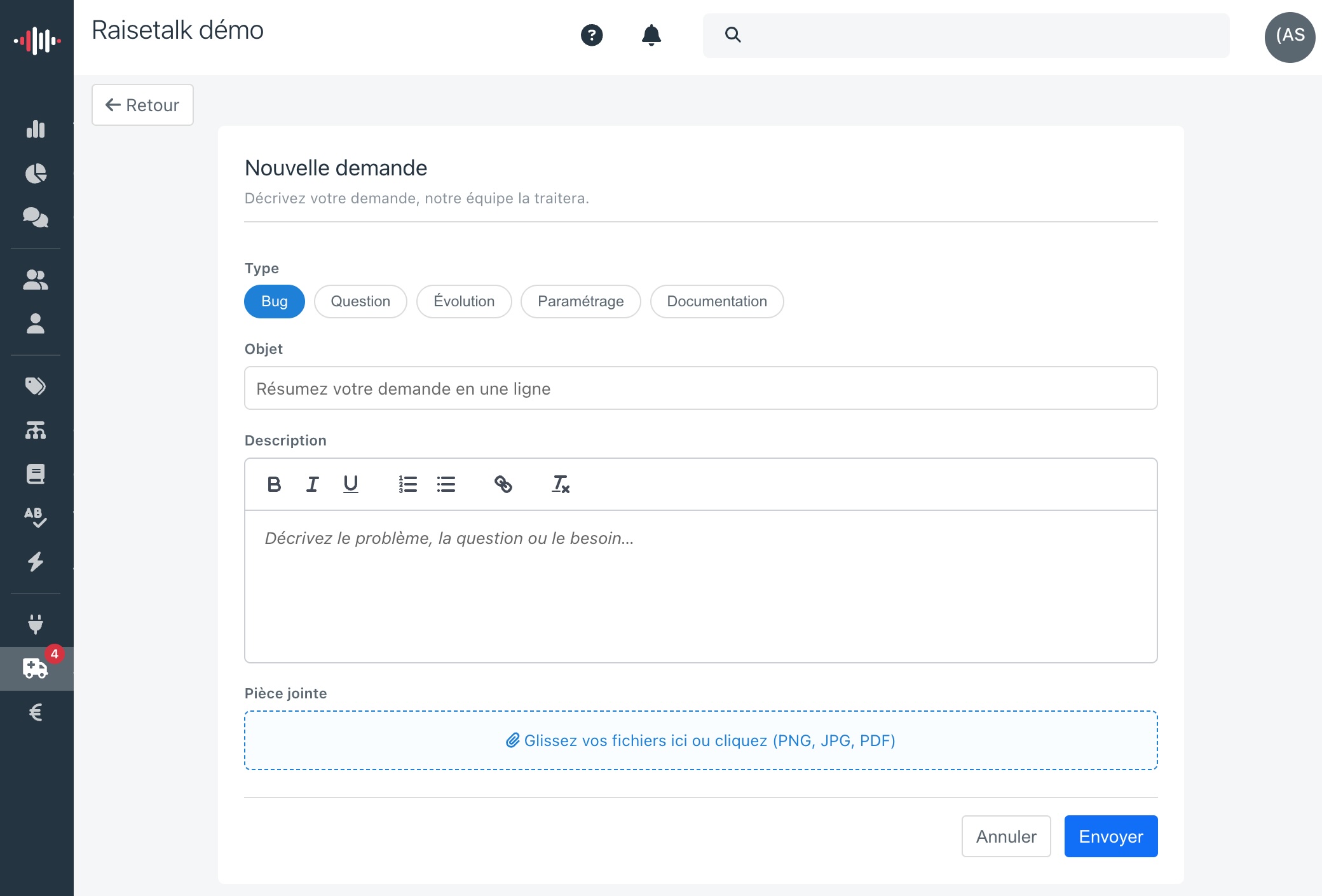
Five request types structure the channel:
| Type | When to use it |
|---|---|
| Bug | An abnormal behaviour or an error in the application |
| Question | A question about how things work or how to use them |
| Evolution | An improvement suggestion or a desired feature |
| Setting | A configuration request (analysis grid, criteria, integration...) |
| Documentation | A clarification or an addition wanted in the documentation |
A subject, a description with formatting, screenshots as attachments if useful: the request is sent in seconds. And because describing your technical environment is the universal chore of support, Raisetalk takes care of it — the page you are writing from and the application version are attached to the request automatically.
Each request is a conversation
Old habits die hard: the Support module applies to requests the very principles Raisetalk applies to your customers' conversations. Nothing gets lost, everything is tracked.
Each request carries its discussion thread: the team answers inside the application, you reply in the same place, and the full history remains available at any time. The status always tells you where the handling stands: New, Acknowledged, In progress, Waiting for you, Resolved or Rejected, with the reason explained in the thread.
No need to keep watch: an automatic email notifies you at creation, at every reply and at every status change, and inside the application, requests holding something new stand out in bold with a badge on the menu.
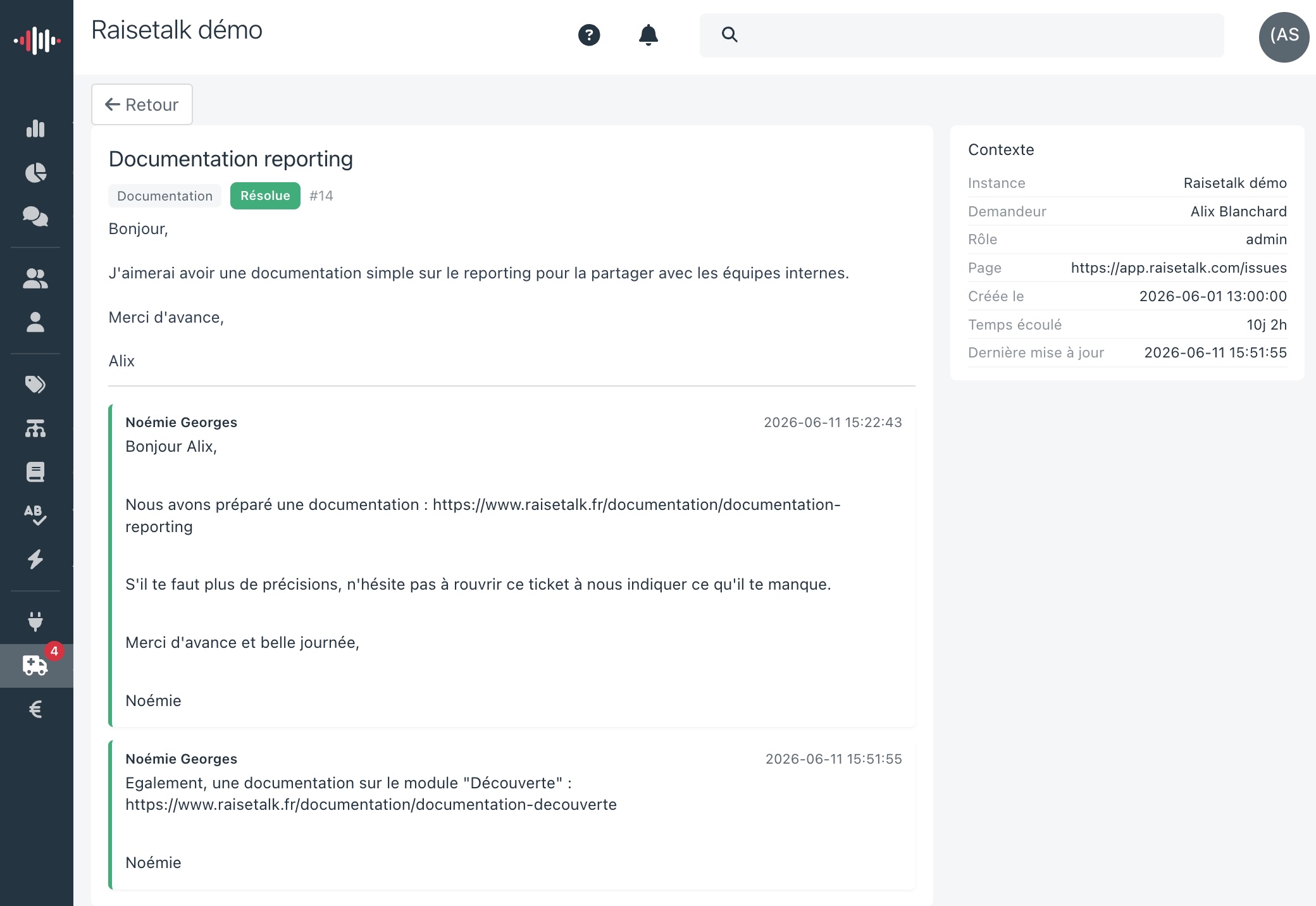
And if a resolved problem comes back, the request reopens in one click, with its full history. No ghost tickets, no "could you send me the context again?".
For partners: your clients' support, inside your Raisetalk
For our integrator and reseller partners, such as SYD Digital Care, the module goes further: it makes them the first-level support of their own clients, without any additional tool.
Concretely, when a user of one of your client instances creates a request, it appears in your Support menu, with the requester, the instance concerned and the technical context. You answer it, you drive the status and the priority according to the impact, and your client is notified by email at every step, without any action on your side.
Two mechanisms keep this setup healthy:
- Scope isolation: you only see the requests of the instances you manage. A partner never sees the requests of a client that is not theirs, and your clients only see their own requests.
- Internal notes: your agents can annotate a request among themselves, to pass context along or prepare an answer. These notes are never visible to the end client.
Support thus joins multi-instance management, autonomous client account creation and custom markup in the partner toolkit: operating a conversational analysis business end to end, in a single tool.
What your requests teach us
There is one more reason behind this integration choice, and it concerns us directly. The Evolution and Documentation types are not decorative: every improvement suggestion feeds the product roadmap, and every clarification request improves the user documentation.
A quality monitoring tool lives on feedback loops: your advisors improve because their conversations are listened to and analysed. We apply the same rule to ourselves. Your requests are our voice of the customer, and they are now structured, traced and actionable, exactly like the conversations we analyse for you.
Getting started
- Log in to your Raisetalk workspace.
- In the menu, click Support: the My requests page opens.
- Click New request and tell us everything: bug, question, idea or configuration need.
Partners: the requests of your client instances appear in your Support menu as of now, flagged by a badge.


