
Discovery
General principle
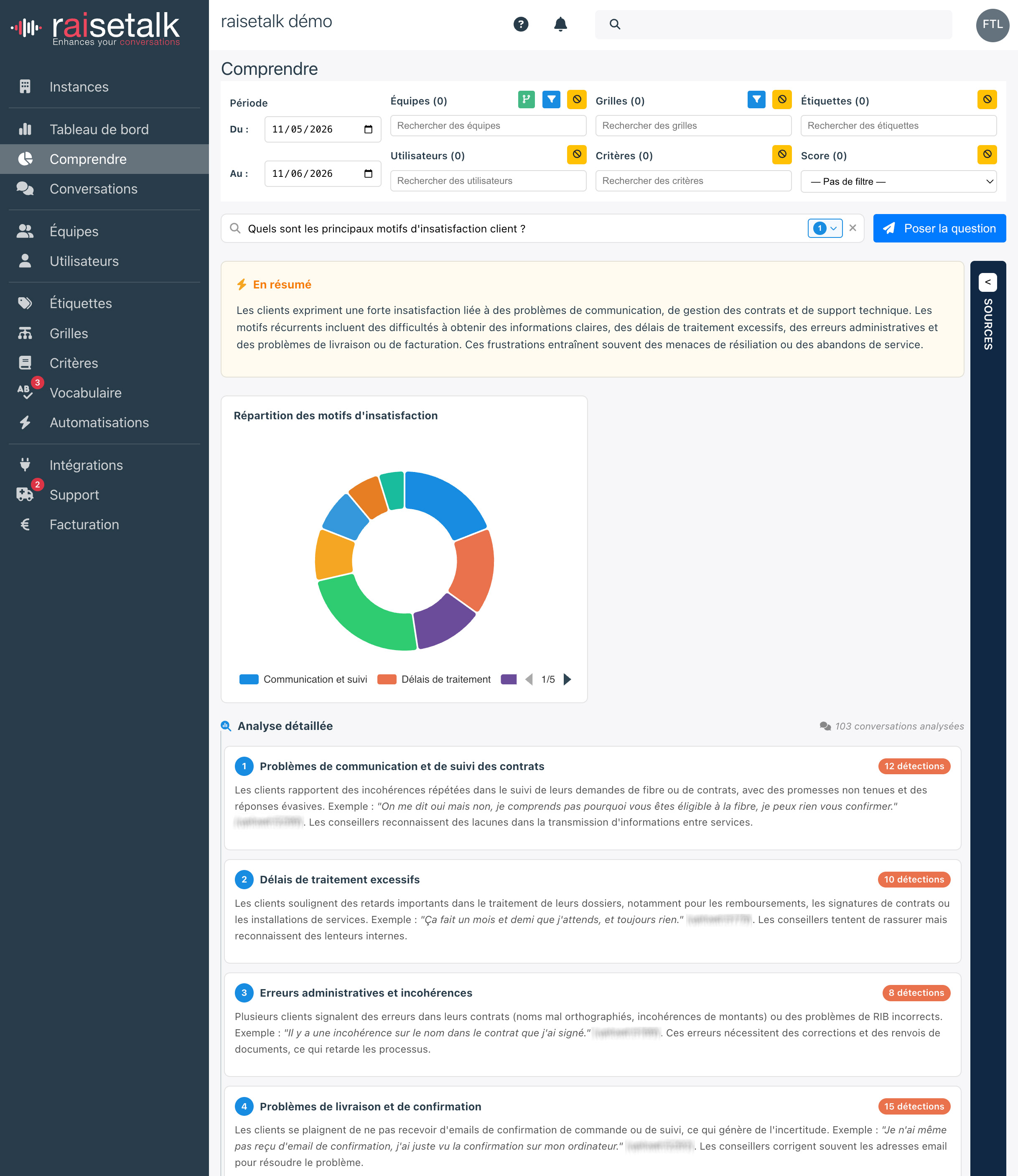
Découverte (Discovery) lets you query all your analysed conversations in natural language: ask a question the way you would ask an analyst, and Raisetalk explores your conversations and answers with a structured synthesis and its sources.
While reporting answers predefined, figure-based questions (scores, trends, rankings), Découverte answers open questions: "Which competitors are mentioned in our calls?", "What are the main reasons for customer dissatisfaction?", "Which objections come up most often?".
Découverte sits on the Understand page, below the Reports section, under the heading labelled "Découverte (bêta)". The feature is offered in beta and enabled organisation by organisation: if the section does not appear in your workspace, get in touch with your Raisetalk representative (see the Activation and rights section at the bottom of this page).

Suggested questions
To get started without a blank page, Découverte offers 25 ready-to-use questions, presented as cards. Each card shows the question and a short explanation of what it analyses; a single click launches the analysis.
The questions are organised into 7 topics, filterable with one click on the pills at the top of the section:
| Topic | Example questions |
|---|---|
| Competition | Which competitors are mentioned in our calls? What competitor offers attract our customers? |
| Satisfaction | What are the main reasons for customer dissatisfaction? Which products/services generate the most dissatisfaction? |
| Process | Recurring friction points and irritants in your customer journeys |
| Sales | Objections, opportunities and sales levers detected in conversations |
| Coaching | Best practices and improvement areas observed among your advisors |
| Incidents | Problems and anomalies reported in conversations |
| Product | Feedback and expectations expressed about your products |
Asking your own question
The search bar at the top of the section accepts any natural language question: type your question, then click Ask the question (or press Enter).
A few tips for better answers:
- Ask a precise question rather than a keyword: "Why do customers threaten to cancel?" works better than "cancellation".
- Mention the exact terms you are interested in (a product name, a competitor, an offer) — they are searched for as-is in the conversations.
- Narrow the scope with the page filters before asking the question (see below).
On the right of the question bar, a Data types to query selector lets you restrict the search to certain sources: transcriptions, client sentiments, advisor attitudes, summaries, criteria or labels. By default, all types are queried.

The analysed scope
The filters at the top of the Understand page apply to every Découverte question: period (by default, the last month), teams, users, labels, grids, criteria and score. They are the same filters as for the reports, described in the reporting documentation.
The same question can therefore be asked on different scopes: compare for instance the dissatisfaction reasons of two teams by asking the same question with two successive team filters.
The answer
The analysis usually takes from a few seconds to a minute, depending on the volume of conversations covered by your filters. You can follow the progress on screen; if the generation does not complete within 1 min 30, a message invites you to run the question again.
The answer is displayed in two panels:
- Synthesis: the written answer, with a Summary block, a Detailed analysis, the number of conversations analyzed and the number of detections. Depending on the question, the answer takes the form of a ranking (reasons, competitors, objections...), a written analysis or an action plan.
- Sources: the conversation excerpts the answer relies on, each with its Relevance score and a View conversation link to open the full exchange. This is your traceability guarantee: every statement in the synthesis can be checked at the source.
Activation and rights
Découverte is an optional feature, enabled instance by instance:
- Activation is performed by Raisetalk for your organisation: it triggers the indexing of your conversations and the configuration of the analysis engine. If you see neither the question bar nor the Découverte section on the Understand page, contact your Raisetalk representative.
- On the user side, access is controlled by the
use_ragright: only users who have it see the section and can ask questions. - The data scope follows the usual visibility rules of roles and rights: a user queries the conversations of their teams and of the teams below; a Viewer only queries their own conversations.