
Key takeaways on securing access
- A conversational analysis tool concentrates sensitive data: call recordings, transcripts, advisor evaluations. Access to it is the first door to protect, and the GDPR (Article 32) requires measures proportionate to the risk.
- For passwords, length comes first. The CNIL, France's data protection authority, asks for the equivalent of 80 bits of entropy when the password is used alone, for example 14 characters. It no longer recommends forcing all users to change their password periodically.
- A second factor makes a stolen password useless. The ANSSI, France's national cybersecurity agency, recommends favouring it, and the CNIL expects it for administrators. It is decided role by role, starting with the accounts that see the most.
- SSO hands sign-in over to your company directory: its second factor applies, and an employee deactivated in the directory can no longer get in. Provided the role requires SSO and refuses the password.
- In Raisetalk, everything is set on a single Security screen: password policy, second factor, reinforced password and SSO required per role, connection to your identity provider with OpenID Connect. Sign-in attempts, for their part, are limited over time, with no setting needed.
Why access is the first line of defence
A conversational analysis tool is not software like any other. It keeps what your customers said on the phone, sometimes their contract number, their address or the reason for a complaint. It also keeps the evaluation of your advisors' work. This is personal data, about your customers and your employees alike.
Yet most incidents do not start with a technical flaw, but with an account: a password reused elsewhere and leaked, a guessed password, a former employee's account left active. In a contact centre, these risks are amplified by the number of accounts, staff turnover, outsourcers and temporary staff.
Article 32 of the GDPR requires any processing of personal data to be protected by measures "appropriate" to the risk. For authentication, two French texts spell out what this means in practice:
- the CNIL's "Recommandation relative aux mots de passe" (Recommendation on passwords; deliberation no. 2022-100 of 21 July 2022), which is not binding but describes, in its own words, the state of the art to be respected as a minimum to comply with Article 32;
- the ANSSI's guide "Recommandations relatives à l'authentification multifacteur et aux mots de passe" (Recommendations on multi-factor authentication and passwords; 8 October 2021), to which the CNIL itself refers readers who want to go further.
This guide sets out their recommendations on the three topics that matter: password policy, the second factor and SSO. It then turns them into settings, role by role.
Password policy: what the CNIL and the ANSSI say
Length before complexity
The CNIL reasons in terms of entropy, that is, the number of combinations an attacker would have to try. When the password is the only means of authentication, it asks for the equivalent of at least 80 bits, and gives three examples:
| CNIL example | Minimum length | Required characters |
|---|---|---|
| Complex password | 12 characters | Uppercase, lowercase, digits and special characters, taken from a list of at least 37 special characters |
| Long password | 14 characters | Uppercase, lowercase and digits, with no mandatory special character |
| Passphrase | 7 words | Words from the French language |
The CNIL specifies that these levels are lower bounds: depending on the risk, a higher level may be necessary.
A shorter password, on one condition
The CNIL accepts a lower requirement, the equivalent of 50 bits, for example 8 characters mixing three of the four types, when authentication restricts access to the account after failures. It cites several forms of restriction, which may or may not be combined:
- a delay that grows with each failure: more than one minute after five failed attempts, and at most 25 attempts in 24 hours;
- a maximum number of attempts within a given period, for example 10 per hour;
- a mechanism against automated submissions, such as a captcha;
- locking the account after at most 10 consecutive failures, with an unlocking process proportionate to the risk.
The ANSSI also recommends limiting the number of authentication attempts over time (R10), to slow down brute-force attacks. A limit set per IP address slows down an attack run from a single machine; it does not restrict access to an account targeted from many addresses. Only a mechanism attached to the account justifies going below 80 bits.
The ANSSI puts it another way: it is often more effective to make a password longer than to make it more complicated. Its guide proposes minimum lengths according to the sensitivity of the system (recommendation R21):
| Sensitivity | Minimum length |
|---|---|
| Low to medium | 9 to 11 characters |
| Medium to high | 12 to 14 characters |
| High to very high | At least 15 characters |
For a password that does not need to be memorised, such as a technical account's, the ANSSI recommends a "very large" length, over 20 characters. It also recommends not setting a maximum length that is too low (R22): a limit of 8 or 10 characters rules out passphrases.
No more forced periodic changes for everyone
This is the most counter-intuitive change in recent recommendations. The CNIL is explicit: data controllers "should no longer impose periodic password changes on all their users". A user forced to change their password every three months ends up choosing a predictable variant of the previous one.
The ANSSI takes the same line (R24): no expiry by default for non-sensitive accounts, as long as the policy enforces strong passwords. Both texts keep one exception: privileged accounts, such as administrators'. For these, the CNIL still considers periodic renewal necessary, and the ANSSI suggests an interval of around one to three years (R25), while recommending that two-factor authentication be favoured for them.
Change it immediately if in doubt
The two texts agree on one last point: a password whose confidentiality is no longer guaranteed must be changed immediately, without waiting for a due date. Expiry should follow the incident, not the calendar.
The second factor: a stolen password is no longer enough
What multi-factor authentication really is
The ANSSI defines multi-factor authentication as combining factors from different categories: something you know (a password), something you have (a phone, a security key), something you are (a fingerprint). A PIN added to a password is not multi-factor authentication: both belong to the same category and fall to the same attacks.
Its first recommendation (R1) is to favour multi-factor authentication. The CNIL, for its part, considers that two-factor authentication "offers more security than a password alone", and expects stronger measures, such as multi-factor authentication, for certain categories of users, starting with IT administrators, and for large-scale processing.
The channel matters as much as the code
A second factor is only as good as the channel it arrives through. The ANSSI recommends not receiving authentication factors by SMS (R8), notably because of line hijacking through SIM swapping.
A code received by email adds a genuine second proof, access to the mailbox, distinct from the tool's password. Its strength depends on how well that mailbox is protected, which the ANSSI describes as a central element of authentication: compromising it generally opens every account attached to it (R36). To go further, the strongest factors are possession factors with a security component, such as a physical key (R39). These are the ones that enterprise identity providers can enforce, hence the value of SSO.
Where to start
Not every group of users presents the same risk. The accounts that see the most conversations, export data or change other people's permissions come first: administrators, quality leads, managers. Advisors, who generally see only their own conversations, follow according to your risk analysis: access from outside, shared workstations, outsourced staff.
SSO: handing sign-in over to your directory
SSO (single sign-on) routes sign-in through your company's identity provider: Microsoft Entra ID, Okta, Google Workspace. The user authenticates there under your company's rules, and the tool receives a signed identity in return.
For a company that has one, it is the most robust route, for three reasons:
- Your directory's second factor applies, with the methods it offers (authenticator app, security key) and your conditional access rules.
- Leaving cuts access. An account deactivated in the directory can no longer sign in, without any action in each tool.
- One password fewer. The user no longer has a tool-specific password to create, remember or reuse elsewhere.
SSO also shifts responsibility: from then on, it is the security of your directory that protects the tool. Three precautions follow.
- SSO must be required, not just allowed. As long as a role also accepts the password, a former employee who knows it can still get in. Requiring SSO per role is what closes that door.
- Your domain must be proven. A tool should only send your domains' addresses to your identity provider, and only after proof that you own them.
- Keep emergency access. If your identity provider is unavailable, at least one administrator must be able to get in another way.
The standard configuration, role by role
The three measures work together. Here is a starting point, to adjust according to your risk analysis; the SSO column assumes your company has an identity provider:
| Profile | Password | Second factor | SSO |
|---|---|---|---|
| Administrators | Reinforced: 20 characters | Yes | Required, while keeping emergency access |
| Managers, quality leads | 14 characters | Yes | Required |
| Advisors | 14 characters | Depending on exposure: access from outside, shared workstations, outsourced staff | Required |
| Technical accounts (integrations) | Reinforced, generated (32 characters for example), stored in a password vault | No: a technical account cannot enter a code | No |
For the whole organisation: no periodic expiry, unless your internal policy requires it, and no reuse of the most recent passwords.
Putting it into practice in Raisetalk
In Raisetalk, all access security is set on a single screen, Security, under a dedicated permission, Manage security. The administrator always holds this permission, and you can delegate it to another role: to your CISO, for example, without giving them the rest of the administration. Every change applies from the next sign-in, without cutting open sessions.
Your password policy
The Password card sets the policy for the whole organisation:
- Minimum length, from 8 to 64 characters. Set it to 14 characters: this is the CNIL's second example for a password used alone, and Raisetalk additionally requires all four character types (lowercase, uppercase, digit, special character). Sign-in attempts are limited per IP address (see below), but not account by account: so it is the requirement for a password used alone that applies. The maximum length is 120 characters: passphrases fit.
- Reinforced minimum length, for the roles that have the Reinforced password switch on: your administrators and your technical accounts, for example 20 characters.
- Expiry, from 30 to 365 days, or never (the default setting). If you turn it on, users are warned 7 days before, 3 days before and on the due date, by email and by a banner in the application.
- Previous passwords not allowed: the current password, or the last 2 to 12.
A user whose password no longer meets the policy, or has expired, cannot sign in with it: they receive a link by email to change it. Tightening the policy therefore locks nobody out for long.

In this example, the organisation enforces a 90-day expiry, as its internal policy requires: the setting allows it, without imposing it on those who follow the CNIL.
The second factor, role by role
The Requirements per role card shows a table of your roles, with three switches for each:
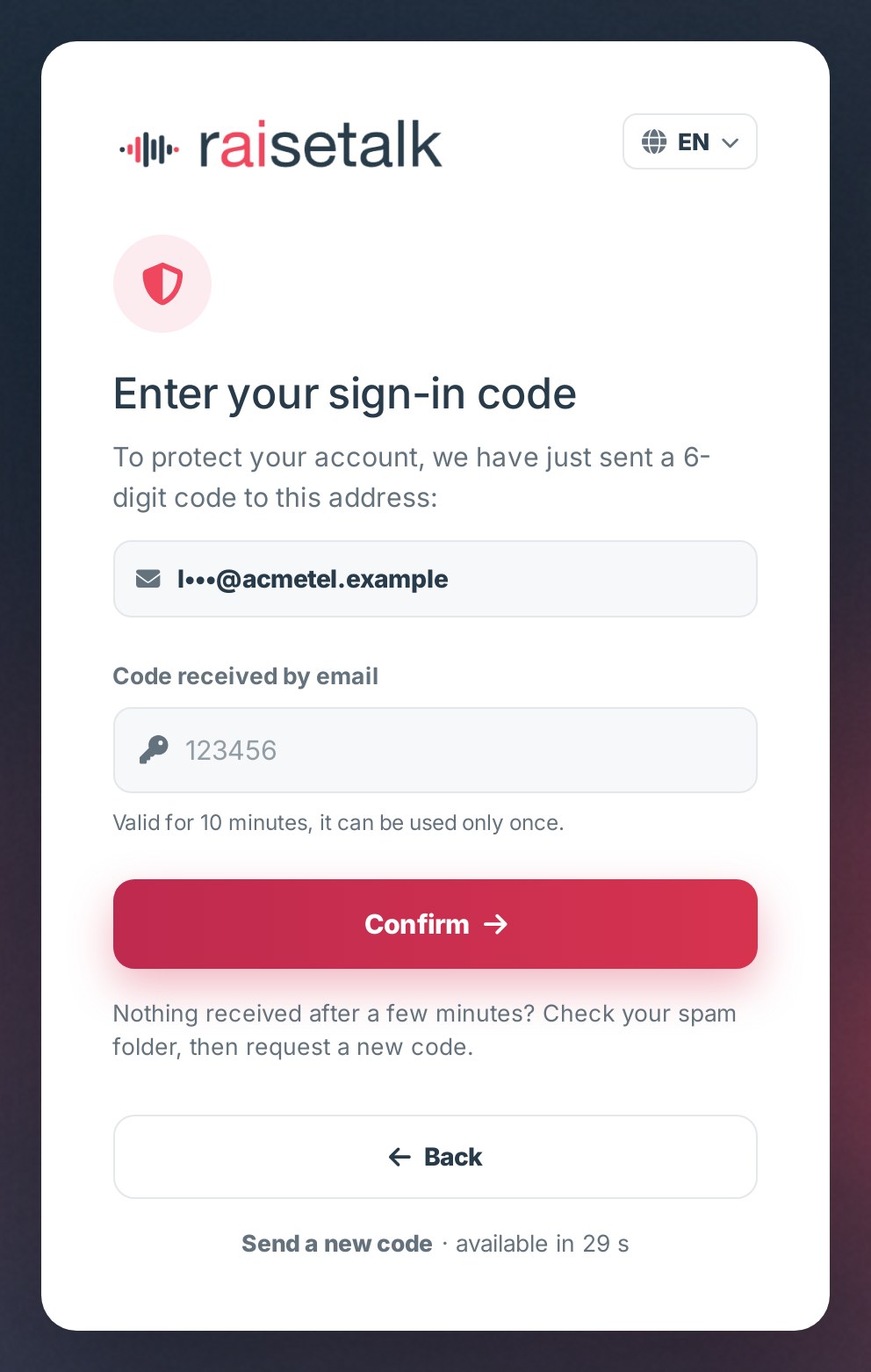
- Second factor: a 6-digit code sent by email at every sign-in, valid for 10 minutes, single-use, invalidated after 5 wrong attempts. There is no "trusted" device: the code is requested every time.
- Reinforced password: the policy's reinforced length applies to the role's accounts.
- SSO required: the password is refused, and sign-in goes through your identity provider.
A New roles setting is carried over to every role created afterwards: a role added six months from now will start out with the second factor if you decided so today.

For the user, the second factor adds a step after the password. They enter the code received, which they can copy and paste, and can request a new one after 30 seconds. A code received without having tried to sign in is a clear signal: someone knows their password, and they must change it.
Before turning on the second factor, check that emails actually reach your users: overly strict filtering on your mail system would block the codes too. And leave your technical accounts in a role without a second factor, since they cannot enter a code.
SSO with OpenID Connect
The SSO connection card links Raisetalk to your identity provider with OpenID Connect, the protocol spoken by Microsoft Entra ID, Okta and Google Workspace. Setting it up takes five steps:
- Register Raisetalk with your identity provider, using the redirect address shown on the card.
- Enter the settings: the issuer, the client ID and the client secret. The secret is encrypted and never displayed again.
- Prove your email domains with a DNS record. Only addresses on your verified domains are directed to your identity provider.
- Test: the test passes when your own account is recognised. It is required before any activation, so that a configuration error locks nobody out.
- Activate, then make SSO mandatory role by role, in the Requirements per role card.

The card also gives a direct link specific to your organisation, to add as a tile in your identity provider's portal: sign-in then starts without typing anything.
A few rules cover the edge cases:
- Accounts are still created in advance. SSO does not open Raisetalk to your whole directory: only the accounts you have created can get in, and their first SSO sign-in activates them.
- A reassigned address inherits nothing. On its first SSO sign-in, an account is linked to the person's identity at your provider. If the address later passes to someone else, sign-in is refused.
- The second factor is your directory's. On a role subject to SSO, Raisetalk's email code and the reinforced password no longer apply.
- Emergency access is monitored. The screen warns you if all the roles holding Manage security are subject to SSO, or if some accounts have an address outside your verified domains.
When an employee leaves and is deactivated in your directory, SSO sign-in is refused to them. A session that is already open closes after your organisation's inactivity timeout, set on the same screen; to cut it immediately, deactivate the account in Raisetalk. To go further, account synchronisation (SCIM 2.0) lets your directory itself create, update and deactivate the Raisetalk accounts on your verified domains: an employee deactivated in the directory then has their account deactivated and their sessions closed immediately.
Attempts limited over time
The public authentication entry points limit the number of requests a single IP address can send in one minute: password sign-in, the start of SSO sign-in, forgotten password and free trial sign-up. Beyond that, the address must wait before trying again. This is the ANSSI's recommendation R10: a brute-force attack from a single machine is slowed down from the very first seconds, and a mailbox cannot be flooded with reset links.
The second factor has its own limits: 5 attempts per code, at most 3 resends, and a "Too many attempts" message after many requests in less than an hour.
These limits replace neither password length nor the second factor. An attack spread over many addresses partly gets around them: against it, what holds is the strength of the password and the second factor.
Logging sign-ins
The ANSSI recommends keeping a history of authentication events, to detect abnormal behaviour (R9). The Raisetalk Sign-in log shows, for each session, whether it was opened with the second factor or through SSO, and keeps refused codes and refused SSO sign-ins. It can be viewed user by user, and a scheduled send can deliver it regularly to your CISO.
Where to start
- Decide who manages security. If your CISO needs to keep control, delegate the Manage security permission to them.
- Tighten the password policy: 14 characters, 20 for reinforced roles, no periodic expiry unless required internally, no reuse of the most recent passwords.
- Turn on the second factor for the roles that see the most, administrators and quality leads first, after checking that your emails get through.
- Connect your identity provider if you have one: test, prove your domains, activate, then require SSO role by role.
- Isolate your technical accounts in a dedicated role, with neither second factor nor SSO, and a long generated password stored in a password vault.
Always keep emergency access. Before requiring SSO for all your roles, keep at least one administrator who signs in with a password and second factor. If your identity provider is unavailable, that is how you will restore access. The Security screen warns you when no holder of Manage security can get in other than through SSO any more.
What these settings do not do
An honest access policy also states its limits.
- An email code is only as good as the mailbox that receives it. Protect the mailbox itself with a second factor; for the most exposed accounts, prefer SSO and your directory's factors.
- A limit per address does not protect an account targeted from many addresses. It slows down brute force; it does not replace a long password or a second factor.
- SSO protects access, not a session that is already open. Without account synchronisation, an open session lasts until the inactivity timeout: deactivate the account to cut it.
- SSO is only as good as the upkeep of your directory. An account forgotten in the directory remains an active account in every tool that trusts it.
- No setting replaces access reviews. The CNIL recommends a regular review of authorisations, for example once a year: who has which role, and do they still need it?
Key terms
- Multi-factor authentication (MFA): authentication that combines factors from different categories: something you know, something you have, something you are
- Second factor: the proof requested in addition to the password; in Raisetalk, a 6-digit code sent by email at every sign-in
- Entropy: a measure, in bits, of how hard a password is to guess; the CNIL asks for the equivalent of 80 bits for a password used alone
- Attempt limiting: a cap on the number of authentication attempts within a given period, per IP address or per account, against brute-force attacks
- Privileged account: an account that can change other people's permissions, settings or access, such as an administrator's
- SSO (single sign-on): sign-in handed over to the company's identity provider, which authenticates the user for all their tools
- Identity provider: the service that holds the company directory and authenticates its users, such as Microsoft Entra ID, Okta or Google Workspace
- OpenID Connect: the standard protocol through which the identity provider passes a signed identity to the tool
- SCIM: the standard protocol through which the directory creates, updates and deactivates accounts in the company's tools
Frequently asked questions
What minimum password length does the CNIL require?
When the password is the only means of authentication, the CNIL asks for the equivalent of 80 bits of entropy. Its examples: 12 characters with uppercase, lowercase, digits and special characters taken from a list of at least 37, or 14 characters with uppercase, lowercase and digits, or a passphrase of 7 words. These are minimums: a higher risk may justify more.
Should regular password changes still be enforced?
Not for all users. The CNIL recommends no longer imposing periodic changes on all users, and the ANSSI recommends not imposing expiry by default on non-sensitive accounts, as long as passwords are strong. Privileged accounts remain the exception, and any compromised password must be changed immediately.
Does Raisetalk limit sign-in attempts?
Yes. Password sign-in, the start of SSO sign-in, forgotten password and sign-up limit the number of requests per IP address and per minute, and the second factor caps its attempts (5 per code) and its resends (3). These limits slow down brute force from a single address. They do not restrict access account by account, in the sense of the CNIL's relaxed case: the recommended length therefore remains that of a password used alone, 14 characters.
Is the code received by email genuine two-factor authentication?
It adds a second proof, access to the mailbox, distinct from the password: a stolen password is no longer enough. Its strength depends on how well the mailbox is protected, which the ANSSI considers a central element of authentication. For the most exposed accounts, SSO lets you apply the stronger factors of your identity provider, such as an authenticator app or a security key.
Should the second factor be turned on when SSO is used?
No: on a role subject to SSO, your identity provider handles the second factor. In Raisetalk, that role's Second factor and Reinforced password switches no longer apply. Do check, however, that your directory requires a second factor to sign in.
What happens when an employee leaves the company?
With SSO required for their role, an employee deactivated in your directory can no longer sign in to Raisetalk. A session that is already open closes after your organisation's inactivity timeout, or immediately if you deactivate their account. With account synchronisation (SCIM), the directory deactivates the account and closes its sessions immediately.
Which identity providers does Raisetalk accept?
Any identity provider compatible with OpenID Connect, such as Microsoft Entra ID, Okta or Google Workspace. Your organisation's administrator sets it up from the Security screen, with no involvement from Raisetalk.
Getting started
Securing access requires neither a heavy project nor an extra tool: a password policy aligned with the CNIL's recommendation, a second factor where accounts see the most, and SSO as soon as your directory can handle sign-in. Raisetalk brings all three together on a single screen, role by role, so that the analysis of 100% of your conversations rests on access as solid as the data it protects. To go further, discover Raisetalk security, how we measure and fix continuously, and how roles and permissions give everyone their own scope; to set up the Security screen on your own accounts, try Raisetalk for free.