
Disputes
What disputes are for
A dispute lets you set an evaluation (conversation) aside from quality monitoring when it should not be taken into account: poor-quality recording, customer GDPR request, out-of-scope conversation, wrong attribution, etc.
A disputed evaluation is excluded everywhere: conversation list, reporting and indicators, exports, and searches in the Discovery section. The action is reversible and fully traced.
Who can dispute?
| Action | Administrator | Supervisor | Advisor | Right |
|---|---|---|---|---|
| Dispute an evaluation (disable it) | ✅ | ✅ | ❌ | disable_evaluation |
| Manage disputes (validate, reactivate, monitoring) | ✅ | ❌ | ❌ | manage_disabled_evaluations |
See also: Default Roles and Rights.
Lifecycle of a dispute
An evaluation goes through the following states:
- Active: normal state, taken into account everywhere.
- Pending: it has just been disputed and is awaiting an administrator's decision.
- Validated: an administrator has confirmed the dispute; the evaluation stays excluded.
- Reactivated: an administrator has rejected the dispute; the evaluation becomes active again and reappears everywhere.
The same evaluation can be disputed several times over time (disputed, reactivated, then disputed again). Each dispute is tracked individually.
Disputing an evaluation
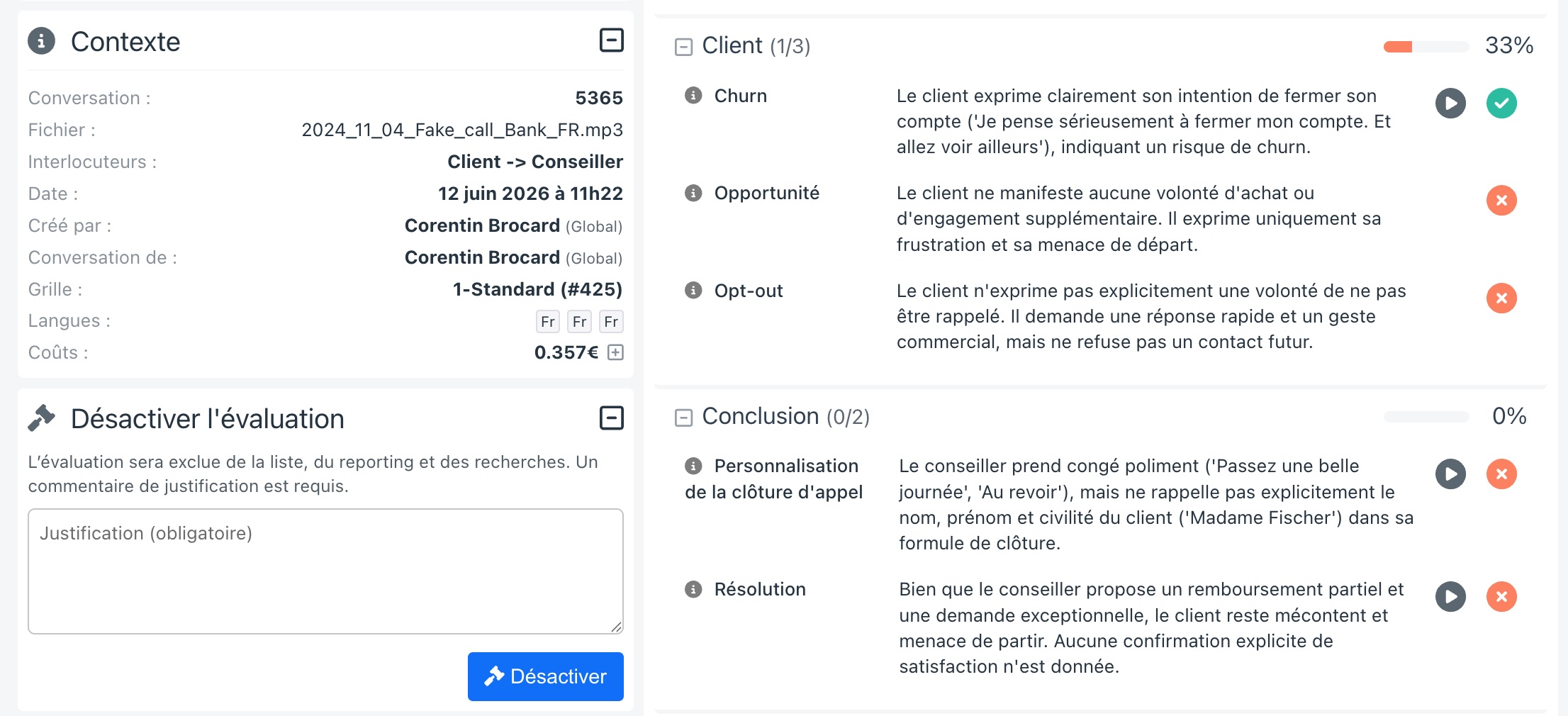
From a conversation's detail page, in the left column, expand the "Disable evaluation" block (visible only if you have the disable_evaluation right).
- Enter a justification comment (required).
- Confirm with the "Disable" button.
The evaluation is immediately excluded from the list, reporting, exports and searches. It moves to Pending validation by an administrator.
An evaluation can be disputed even if its analysis is not yet complete.
Effect of a dispute
While an evaluation is disputed (pending or validated):
- it no longer appears in the conversation list;
- it is excluded from reporting and all indicators;
- it is excluded from exports (CSV and PDF);
- it is no longer used in Discovery searches;
- its detail is only accessible to administrators (
manage_disabled_evaluationsright). Other users can no longer open it.
On the detail page, the analysis content is intentionally greyed out; a "Show anyway" button lets you consult it occasionally without reactivating the evaluation.
Monitoring and handling disputes
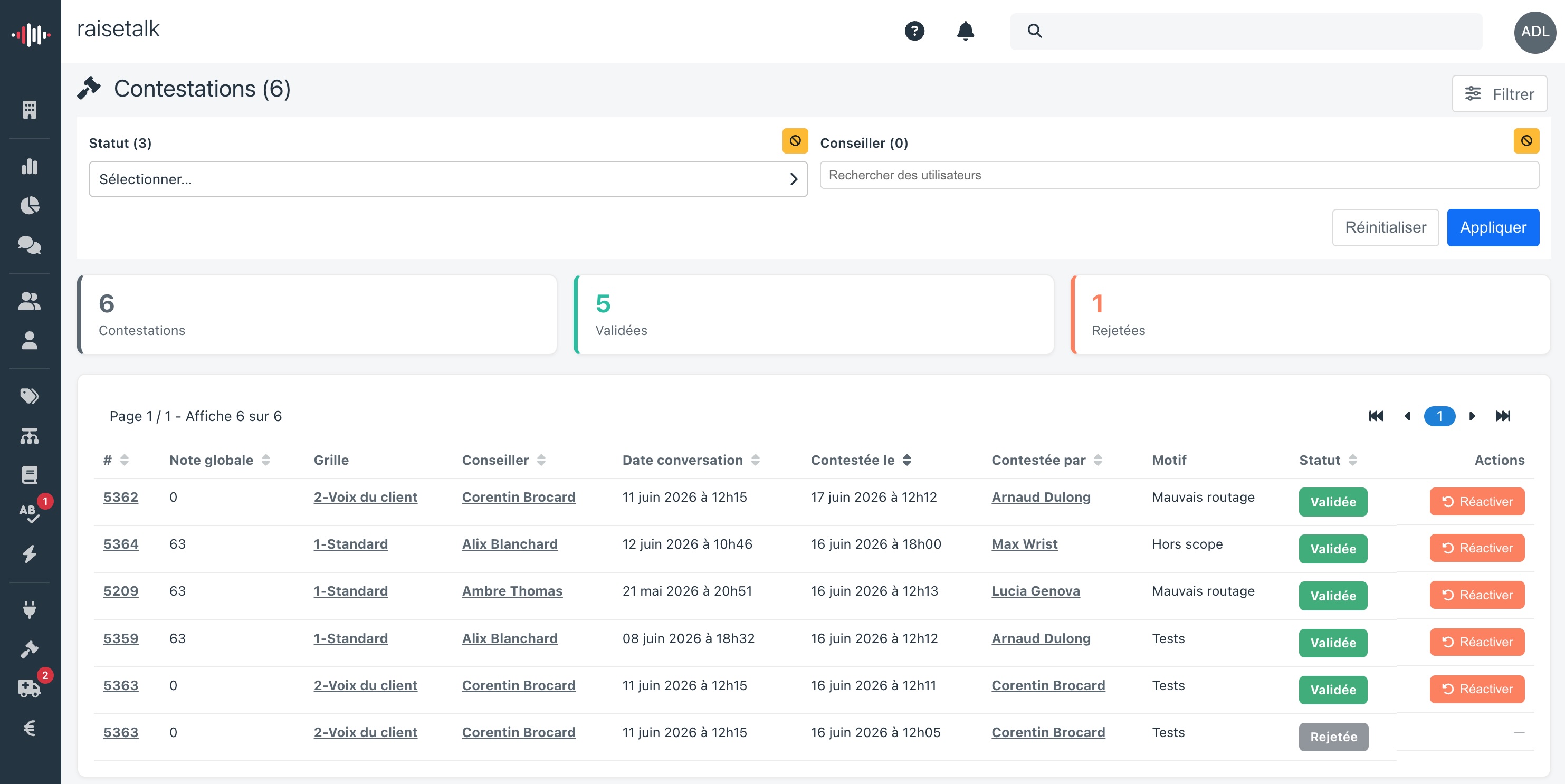
Administrators have a dedicated "Disputes" page (side menu). A badge shows the number of disputes awaiting handling.
This page lists one row per dispute (an evaluation disputed several times therefore appears several times):
- Indicators (clickable cards to filter): total number of Disputes, Validated and Rejected.
- Filters: by status (pending / validated / rejected) and by evaluated advisor.
- Columns: conversation id, global score, grid, advisor, conversation date, dispute date, dispute author, reason, status.
- Hovering a Validated or Rejected status shows the comment of the decision.
For each pending dispute, two actions are available:
- Validate: confirms the dispute; the evaluation stays excluded.
- Reactivate: rejects the dispute; the evaluation becomes active again. A justification comment is required.
Traceability
Each step (dispute, validation, reactivation) creates a version of the evaluation, with its author, date and comment. The full history is available from the detail page (clock icon), where dispute steps appear alongside evaluation changes.
